
Smart Time Tracking for Modern Teams
The work gets done, then someone reconstructs the hours at month end — and the workings live somewhere else entirely.
SyncClock makes time tracking easy, helping you increase profitability by effectively monitoring time spent on various tasks. Task requests get approved before work starts, recurring compliance tasks repeat themselves, and your workings attach right to the task — so when the work is done, you raise the invoice straight from it.
Recurring
compliance tasks generate themselves
Workings
attached to the task itself
0
re-keying between work and bill
Create the activity once, reuse it
Build a template activity and reuse it every time that work comes round — and set recurring compliance to repeat on its own schedule.
Workings attached to the task
The files behind the work live with the work, so the paper trail is never assembled after the fact.
Hours that already know their value
Each employee carries an hourly charge rate, so when you raise the invoice from the task the numbers are already there.
Create the activity once — reuse it on every task
Build a template activity in Activity, with the steps the job is actually made of. Every time that work comes round — another client, another year — you create the task from the template instead of describing it again.
Template activity
Statutory Audit
Tasks created from it
Anand Textiles Pvt Ltd
FY 2025-26 · Ananya Krishnan
Statutory Audit · 6 activities carried over
Kaveri Agro Foods
FY 2025-26 · Karthik Nair
Statutory Audit · 6 activities carried over
Vasanth Motors Ltd
FY 2025-26 · Meera Iyer
Statutory Audit · 6 activities carried over
Four names on the work, not one assignee
“Who was supposed to do this?” is a question a firm should never have to ask twice. A recurring task names the manager, the owner, the person doing it and the person checking it — under a category and sub-category, against an activity code.
Every recurring task carries
Task manager
Owns the engagement the work belongs to.
Task owner
Answerable for it getting done at all.
Responsible person
The one actually doing it this cycle.
Reviewer
Checks it before it counts as finished.
Timesheets to the minute
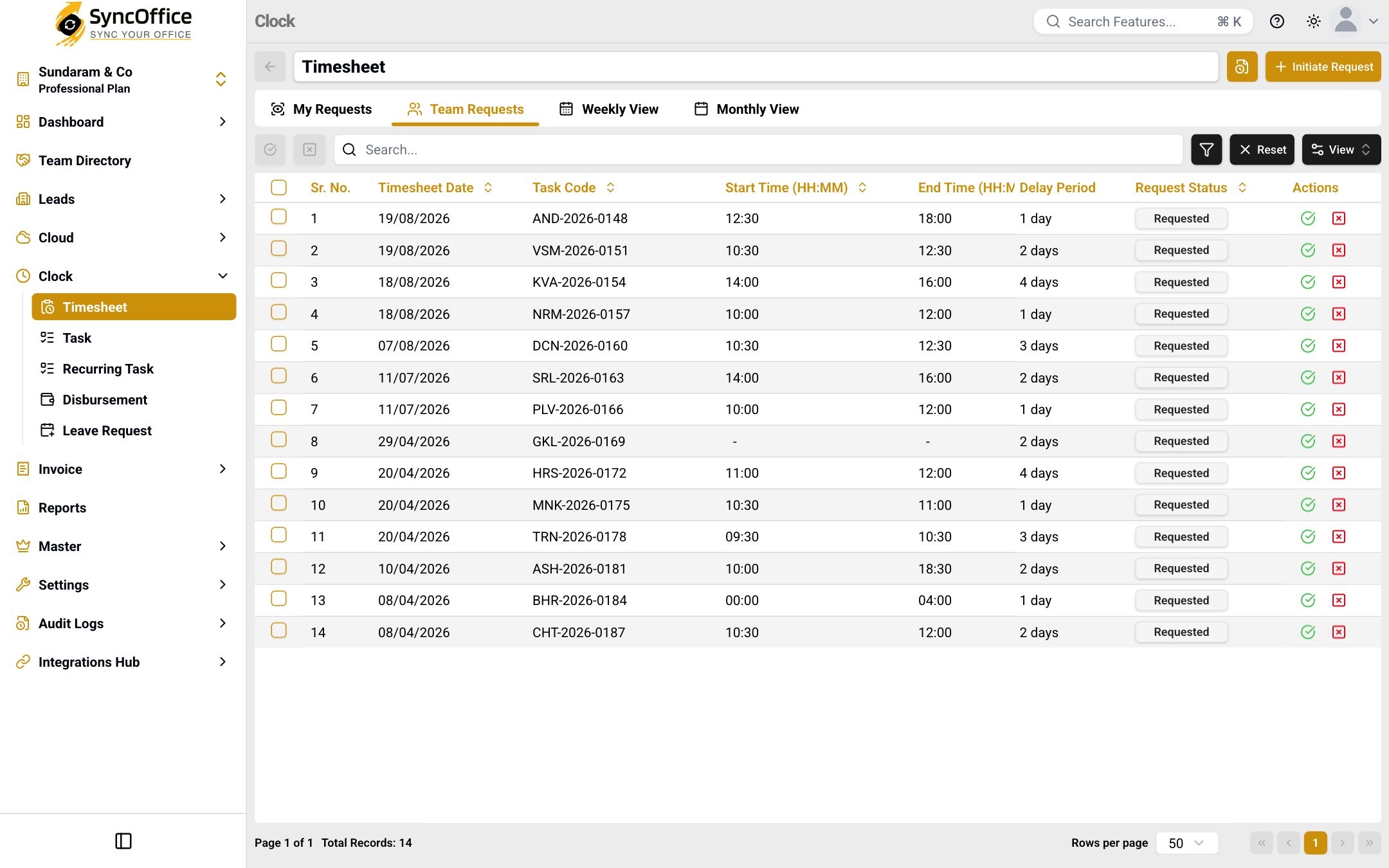
An entry carries the task code, the date, a start and end time and the duration in hours and minutes — not a number someone rounded at the end of the week.
Disbursements with their nature
Each one records the expense nature, the payment source and any reimbursement amount, against the task it belongs to — and a month of them can be uploaded in bulk.
Leave in half days
Start and end sessions mean a half day is a half day, with the approver it was sent to, when it was authorised, and how long that took.
Nothing is recorded without a second pair of eyes
Task requests are approved before the work starts; timesheets, disbursements and leave are reviewed before they stand. Each keeps its own requests, with My Requests and Team Requests side by side — approved or rejected on the spot, and every decision logged.
Every hour already knows what it's worth
Each person carries an hourly charge rate. Hours land against a task code, disbursements carry their expense nature — so when you raise the invoice from the task, the numbers are already there.
Task · GST filing — Kaveri Agro Foods
Ready to bill
₹62,150
Fees₹54,150
Disbursement₹8,000
Raise the invoice from this task and these lines come across.
A partner can see where all the work stands
The dashboard's Clock view answers it without asking anyone: what's yet to start, what's moving, which requests are piling up — and whose desk they're sitting on.
Task status counts
Overview of task status distribution
Request activity
Requested · Approved · Rejected · Cancelled, per type
Task distribution by reporting authority
Who is carrying the work — and who is carrying the overdue
Every card filters by time range, and any card can be pinned to your Favorites.
From assigning work to billing it
A task is assigned
Create it from a template activity you built once, and it is approved before the work starts.
Repeating work repeats itself
Recurring compliance tasks generate on their own schedule; nothing depends on someone remembering.
Your team logs the hours
Hours go straight onto the task through timesheets — no separate spreadsheet, no end-of-month reconstruction.
Working files attach to the task
The files behind the work live with the work, so the paper trail is never assembled after the fact.
You raise the invoice from that work
Raise the invoice straight from the task — the tracked hours and disbursements come across as billable line items.
What you gain by giving outsiders the right access
Work stalls waiting on people who are not on your payroll — a client who has not sent a document, a reviewer who needs a file, a prospect who has not signed. SyncClock lets them in on your terms instead of over email.
Client staff
In every module
- See the tasks that are waiting on them
- Know what is pending without emailing anyone
- Send what a task needs, against the task itself
- See where each task stands — yet to start, in progress or done
- See what is coming up, not only what is already late
- See only their own work, never another client's
Fewer status calls. The client can see where their work stands, so your team answers questions once instead of daily.
Guest access belongs to SyncCloud, and lead access to SyncDoc — Clock is for the people doing the work and the clients waiting on it.
Everything SyncClock does for you
39 capabilities
SyncClock inherits the same controls as the whole suite
Roles + data access
Every user — employee, client staff, guest or lead — is governed by what their role allows and which data they may see.
Segregation of duties
The person who raises a change is never the person who approves it — across every module, not just this one.
Tamper-evident audit log
Who did it, what changed, when — recorded across every module, so nothing is quietly altered.
Encrypted & backed up
End-to-end encryption with regular backups, available around the clock.
SyncClock — common questions
11 answered
Yes. Shift types are assigned by company location, and week-off policies are set as policy rather than tracked by hand — so a Bengaluru office and a Hyderabad office can run differently.
No. Each company location keeps its own holiday list, so a regional holiday doesn't have to apply to everyone.
Yes. Each employee carries an hourly charge rate, so a manager's hour and an article's hour are valued differently the moment they're logged.
Task access assignment controls it, by company and location — on top of the role and data access every user already has.
Yes. The same timesheet data has Weekly and Monthly views alongside the list, plus search, filters and a column chooser.
As a disbursement, classified by expense nature and attributed to a payment source, then approved like any other request.
Yes. Every screen has a change log, and requests move through Requested, Approved, Rejected or Cancelled with each state written down.
No. Set the recurrence once and the tasks generate themselves on schedule.
Yes — that's the point of workings. The supporting files sit on the task, so the evidence and the effort stay together.
Not automatically. You raise the invoice from the task when the work is ready to bill, and its tracked hours and disbursements come across as billable line items, so nothing is re-keyed.
Yes. Leave requests are raised and approved in the same governed place as the work.
SyncClock is one part of one suite
Define your companies, clients and people once in SyncMaster — every module reuses them, with roles, access and a tamper-evident audit log across all of it.

Firms like yours, already in sync
Partners and founders on what changed when their firm moved to SyncOffice.
With multiple clients and sensitive case files, we needed a system that ensures confidentiality without slowing down our workflow. SyncOffice delivers exactly that—secure client document management with intelligent role-based permissions built in.
KV Suresh Babu · Senior Partner
RVKS AND ASSOCIATES
In financial services, compliance and data protection are critical. SyncOffice gives us ironclad security with granular, role-based access—so every user gets the right level of control. Our audit process has become faster, and our risk is lower.
NJ Suresh · Founder
N. J. SURESH ASSOCIATES
As our agency scaled, so did the complexity of managing clients and teams. SyncOffice helped us bring structure and security to our operations—every role has defined access, every file is in place, and every client is handled with care.
Sreedar Reddy G · Chartered Accountant
Sreedar Mohan & Associates
See SyncClock on your own data
₹500 a user. First 250 GB free. Setup and training included.