Intelligent File Management & Collaboration
Your client files are in five places — a shared drive, three inboxes and someone's laptop. When an audit lands, assembling them costs days of billable time.
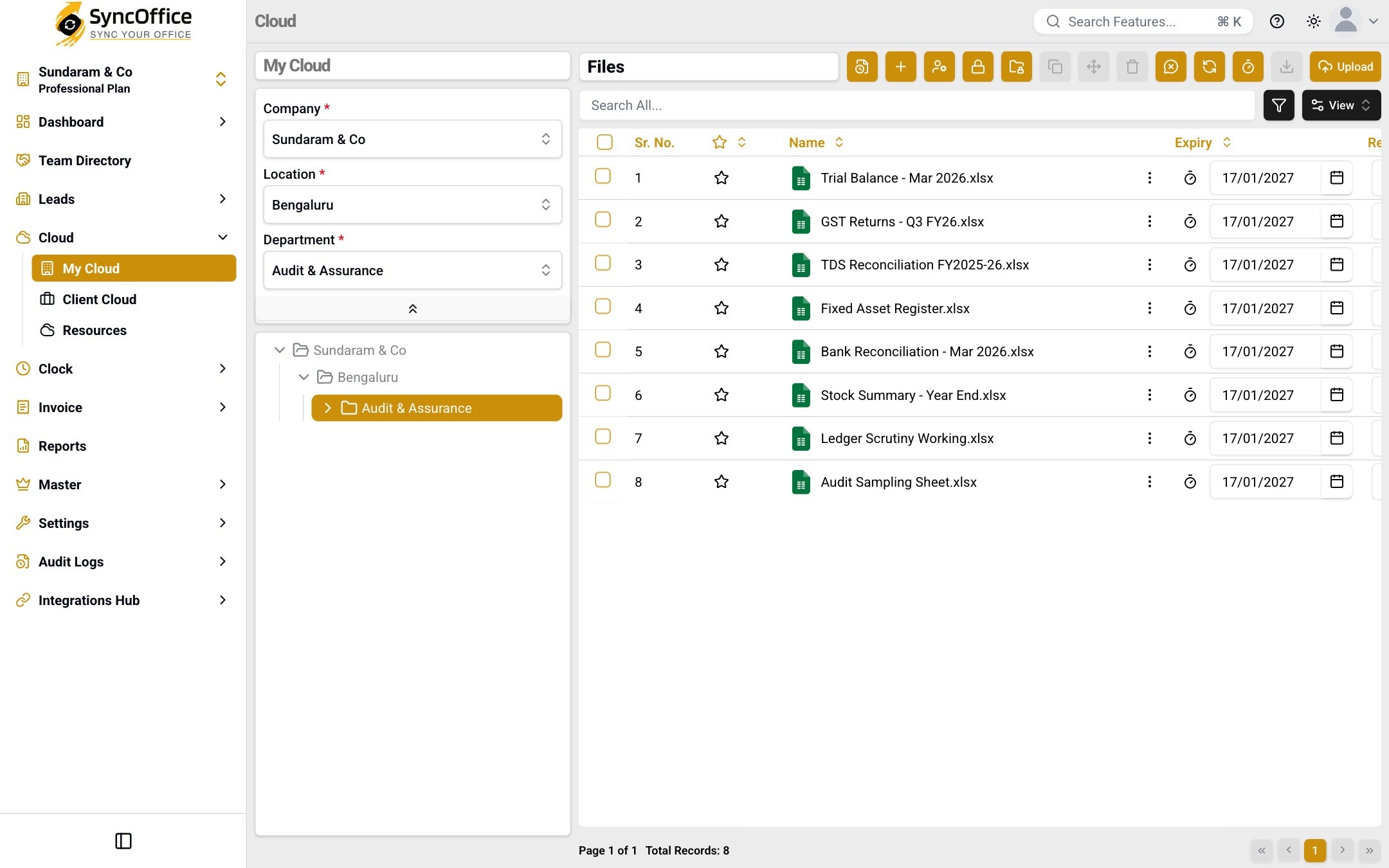
SyncCloud is more than just storage; it's an intelligent platform for file management and collaboration. Three clouds — My Cloud, Client Cloud and Resources — with folder locks, expiry set on the file itself, per-employee upload and download limits, and sharing controlled down to a single file.
3
clouds, walled off from each other
250 GB
free to start
Every
version kept and restorable
Three clouds, one set of rules
My Cloud holds your group companies' data under company, location and department; Client Cloud does the same per client; Resources is the knowledge base you share into either.
Locked down to a single file
Folder locks, an expiry date on each file, and per-employee upload and download limits. Delete needs permission; restore is always there.
Every version, traceable
Full version history on every document, so you can roll back and prove what changed when.
Not one drive for everything — three, with one set of rules
A shared drive puts your files and your clients' files in the same place and hopes for the best. SyncCloud separates them by design.
Everything your firm owns — organised by company, location and department, mirroring how you're actually structured.
Who can open it: Your employees, by role and data access
Access follows the person, not the folder
Every user is governed by their role and the data they may see — at company, location and department level.
| Who | My Cloud | Client Cloud | Resources |
|---|---|---|---|
Partner Full reach across the firm | |||
Associate Only the clients they're assigned | |||
Client staff Their own client, nothing else | |||
Guest auditor Time-boxed, review only, every view logged | |||
Departed employee Access revoked automatically |
Full · Only what's assigned or shared · No access
See the whole document estate without asking anyone
The dashboard's Cloud view answers the questions a partner actually has: how much storage is left, which requests are waiting on someone, and what is about to expire.
Storage
Used against your plan's limits
Upload limit
Storage utilisation
181.58 GB available
68.42 GB used
Download limit
Download utilisation
431.58 GB available
68.42 GB used
Request activity
Requested · Approved · Rejected · Cancelled, per type
12
files expiring in 30 days
7
locked folders
184
files carrying versions
39
files with links
What happens to a file after you upload it
Nothing gets overwritten
Upload a new copy and the old one is still there. The file list shows which files have older versions, so you can check before you open anything.
Related files stay linked
Link a file to the ones that belong with it, so a document never sits on its own without the papers that explain it.
Folders can be locked
Lock a folder and nothing inside it can be renamed or moved by accident. One screen shows every folder you have locked.
You can share just one file
Share a single file instead of the folder around it — with your team, with client staff, or with a guest whose access runs out on a date you set.
Each file has an expiry date
The date sits on the file itself, not just the folder. Files close to expiry are listed together, so a renewal never depends on someone remembering.
Deleting needs approval
A delete is requested, reviewed and recorded rather than done quietly — and anything removed can be restored.
| Capability | Traditional File Servers | Generic Cloud Storage | Enterprise File-Sharing Tools | SyncOffice |
|---|---|---|---|---|
| Role-Based Permissions | ||||
| Approval Workflows | ||||
| Audit Trails | ||||
| Department Hierarchy | ||||
| Client Segregation | ||||
| Compliance Controls | ||||
| Retention Policies | ||||
| Multi-Location Management |
Governance coverage
Full · Partial / add-on · Not available
What happens to your document, step by step
You upload the file
My Cloud for your group companies, Client Cloud for each client, Resources for the knowledge base you share into either.
It gets filed in the right folder
Company, location and department are picked first — the scope is required, so the tree always mirrors the firm and nobody hunts for the latest version.
Access is locked down
Folder locks, an expiry date on the file itself, per-employee upload and download limits, and sharing controlled down to a single file.
You share it safely
Client staff see only their own client. Reviewers and auditors get time-boxed guest access — every view logged.
It expires on its own date
Expiry and retention run automatically. Delete needs permission, and restore is always there.
What you gain by giving outsiders the right access
Work stalls waiting on people who are not on your payroll — a client who has not sent a document, a reviewer who needs a file, a prospect who has not signed. SyncCloud lets them in on your terms instead of over email.
Client staff
In every module
- Upload the documents you asked for, straight into the right folder
- See their own client's space and nothing beyond it
- Every upload recorded against their name
- Send a large file without fighting an email attachment limit
- Find what they sent you last time, instead of asking you to resend it
- Never see another client's space, even with a link
The chasing stops. The client files it themselves, in the right place, and you stop re-filing email attachments.
Guest users
SyncCloud only
- Review exactly the folders assigned to them
- Work inside an access window that expires on your date
- Every view recorded in the audit log
- Be given company documents too when a review needs them, not only client files
- Have access withdrawn the moment the review ends, without waiting for the date
- Review without an account of their own to set up and manage
An auditor, reviewer or consultant gets what they need and nothing else — and the access closes itself, so nobody has to remember to revoke it.
Lead access belongs to SyncDoc, where an engagement is reviewed and signed.
Everything SyncCloud does for you
13 capabilities
SyncCloud inherits the same controls as the whole suite
Roles + data access
Every user — employee, client staff, guest or lead — is governed by what their role allows and which data they may see.
Segregation of duties
The person who raises a change is never the person who approves it — across every module, not just this one.
Tamper-evident audit log
Who did it, what changed, when — recorded across every module, so nothing is quietly altered.
Encrypted & backed up
End-to-end encryption with regular backups, available around the clock.
SyncCloud — common questions
16 answered
Yes. Upload and download limits are set per employee, and the download action itself is permission-gated and recorded — so someone can work with a file without being able to take it away, and you can see who took a copy of what.
Yes. Folder lock stops the contents being renamed, moved or reorganised, which is what you want once a year's working papers are final.
Sharing is controlled down to a single file, so a client or a reviewer sees exactly that document and nothing around it.
Yes — every document carries its full version history, so you can compare, roll back, and show what changed and when.
No. Client Cloud is segregated per client, and every user is governed by roles plus data access — so people only ever see the clients and folders they're entitled to.
Access is revoked automatically when a user is un-assigned, so it never lingers after someone leaves.
Yes. Deletion needs permission in the first place, deleted items go to a recycle bin, and restore is always available — along with full version history on every document.
Client staff sign in to their own portal and upload or download exactly what's shared with them. For outside reviewers and auditors, guest access is temporary and expires on schedule.
My Cloud holds your own firm's documents, filed under a company, location and department. Client Cloud does the same per client, so each client's records sit in their own space. Resources is the shared library you keep once and draw on for either — templates, checklists, reference material. The three are walled off from each other, and access is granted per user.
Yes — in My Cloud and Client Cloud the company (or client), location and department are chosen before you get to the files, so nothing can be uploaded loose. That is what keeps the tree matching how the firm is actually organised, and it is why access can be granted by location or department later.
On its own date. Expiry sits on the individual file, so one document can be set to lapse in 14 days while everything around it stays put. Files approaching expiry are listed together, so a renewal surfaces as something the system holds rather than something a person has to remember.
Yes. A file can be linked to related files so a document carries its context — an engagement letter with its working papers, a drawing with its approval. The file list shows which files carry links, so you can see the connection before opening anything.
Copying is a request rather than a quiet action — it is raised, reviewed and recorded, with My Requests and Team Requests queues showing where it stands. Copy, move, delete and download only ever act on the files you have actually selected, so nothing shifts by accident.
A guest can be given access to company documents as well, but only to what has been assigned to them — never the whole cloud. Guest access is time-boxed, every view is recorded, and it can be withdrawn at any point.
Yes — upload and download limits are set per employee, so a junior on a client engagement is not able to pull the whole vault down. Access for inactive users is also un-assigned automatically, so someone who stops using the system stops holding access to it.
Yes. Every folder carries its own log, and downloading is a governed action in its own right — permission-gated and recorded — so you can answer who took a copy of what, and when, without reconstructing it from memory.
SyncCloud is one part of one suite
Define your companies, clients and people once in SyncMaster — every module reuses them, with roles, access and a tamper-evident audit log across all of it.
Firms like yours, already in sync
Partners and founders on what changed when their firm moved to SyncOffice.
With multiple clients and sensitive case files, we needed a system that ensures confidentiality without slowing down our workflow. SyncOffice delivers exactly that—secure client document management with intelligent role-based permissions built in.
KV Suresh Babu · Senior Partner
RVKS AND ASSOCIATES
In financial services, compliance and data protection are critical. SyncOffice gives us ironclad security with granular, role-based access—so every user gets the right level of control. Our audit process has become faster, and our risk is lower.
NJ Suresh · Founder
N. J. SURESH ASSOCIATES
As our agency scaled, so did the complexity of managing clients and teams. SyncOffice helped us bring structure and security to our operations—every role has defined access, every file is in place, and every client is handled with care.
Sreedar Reddy G · Chartered Accountant
Sreedar Mohan & Associates
See SyncCloud on your own data
₹500 a user. First 250 GB free. Setup and training included.